Cynzia Light: A Font for Creative Makers
There’s something about the way Cynzia Light sits on a page that feels like a breath of fresh air. I was working on a batch of candle labels when I first noticed how this font brought a soft, modern energy to my designs. Its rounded corners and geometric structure give it a friendly yet polished look, perfect for handmade products that need a touch of sophistication without losing their personal charm.
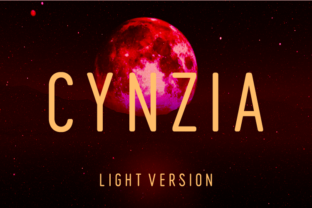
Cynzia Light is a condensed geometric sans serif with a playful twist. The rounded edges on the tops and bottoms of each letter make it feel approachable, while the clean lines keep it looking sharp. It’s not too rigid, nor too casual—it strikes a balance that works well for both digital and physical projects. Whether I’m designing a greeting card or preparing a printable wall art template, Cynzia Light always feels right at home.
Using Cynzia Light in Handmade Projects
One of my favorite uses for Cynzia Light is on candle labels. The font’s compact design allows me to fit more text into a small space without sacrificing clarity. I often pair it with a simple serif font for a layered effect, but even on its own, it adds a modern touch that elevates the overall look of the product. It also pairs well with rustic elements, making it ideal for farmhouse-style signs or seasonal tags.
I’ve used Cynzia Light on wedding invitations, where its clean lines and rounded shapes create a sense of warmth and elegance. It’s great for titles and headings, and the font’s readability makes it easy to use for short phrases like “Save the Date” or “Wedding Details.” When paired with a script font for names, it creates a balanced and cohesive design that feels both professional and personal.
Creative Applications for Cynzia Light
For printable wall art, Cynzia Light adds a contemporary flair that complements minimalist or modern decor. I’ve designed several pieces using this font, from motivational quotes to seasonal greetings. Its versatility means it can be used for anything from a birthday card to a planner page, offering a consistent visual language across different formats.
On product packaging, Cynzia Light helps create a cohesive brand identity. I’ve used it on boutique tags and packaging inserts, where its legibility and style make it easy to read from a distance. It also works well on small stickers and labels, especially when cut with a Cricut or Silhouette machine. The font holds up well at smaller sizes, making it a reliable choice for detailed work.
Designing with Cynzia Light
When I’m working on a new project, I often start by testing Cynzia Light in different contexts. I’ll type out a sample label, print it, and see how it looks in real life. This helps me understand how the font will appear on various materials—whether it’s paper, fabric, or vinyl. It’s also useful for checking how it looks in different lighting conditions, which is important for shop listings and product images.
For digital downloads, Cynzia Light is a go-to choice. I’ve created printable planners, calendar templates, and social media graphics using this font, and it consistently delivers a clean, professional look. It’s also great for mockup previews, where the font’s structure helps convey the intended design without overwhelming the viewer.
Pairing Cynzia Light with Other Fonts
While Cynzia Light works beautifully on its own, it also pairs well with other fonts to create dynamic designs. For example, I often use it alongside a simple serif font for a classic contrast, or with a script font for a more decorative touch. When designing a wedding invitation, I might pair it with a handwritten font to add a personal, artisanal feel.
It also works well with bold display fonts for headings or logos. The combination of Cynzia Light’s geometric shape and a strong, bold font can create a striking visual impact, perfect for branding or promotional materials.
Considerations for Using Cynzia Light
Before using Cynzia Light for commercial purposes, it’s important to check the licensing details. Make sure the font includes all necessary styles, alternates, and ligatures for your project. If you’re designing for multiple languages, confirm that the font supports the characters you need. For digital downloads, ensure the file formats are compatible with your workflow.
When using Cynzia Light on cutting machines, keep in mind that the font’s condensed nature can sometimes affect how the design cuts. Test a small sample first to ensure the letters are clear and precise. For printed cards or labels, make sure the font size is large enough to maintain readability, especially for smaller formats.